
Sixtyfour
Designed By
Jens Kutílek
1 Style Monospace
Type Specimen / 01Il1 O0
{ } [ ]
Sixtyfour · Regular
Compare letter widths, punctuation and figures in an aligned setting.
1 style available. Compare the specimens below, or enter your own text.
Download Sixtyfour ↓TTF · SIL Open Font License 1.1
Set Your Own Text
Change the style and size to compare the letterforms.
38911 BASIC BYTES FREE
Every Position Counts
Sixtyfour · Regular
Equal-width letters and figures.
Specimen.js
const family = "Sixtyfour";

function specimen(size) {
  return { family, size };
}

specimen(24);
0123456789
9876543210
Il1 O0 {} []
1 Style,
One Family
Every available style is shown below in its own font file.
Regular400
38911 BASIC BYTES FREE
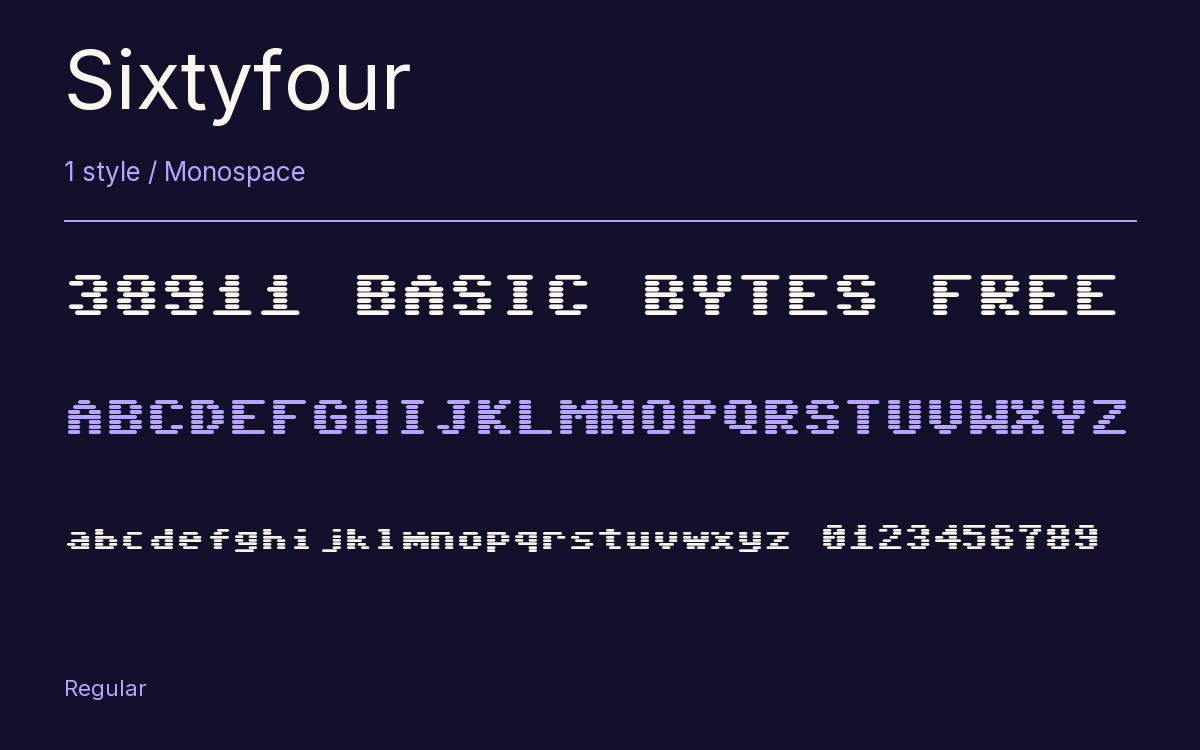
What did a pixel font look like on the screen it was made for? Jens Kutílek took that question from Norbert Landsteiner’s article “Raster CRT Typography (According to DEC)” and went back to pixel versions of the Commodore 64 font that Kutílek had drawn years earlier.
The answer was to imitate the tube. The variable design gets 2 custom axes: Scanlines, which sets the height of each line of pixels and so how much dark gap shows between them, and Bleed, which smears pixels sideways the way the slow phosphor of a CRT did. The Regular on this page shows the default look. A sibling family, Workbench, does the same for the Amiga.
It is very wide. A line of Sixtyfour runs about 82% longer than the same characters in Consolas, so think of it as a title face, a game screen or a poster line. The character set is small on purpose, close to what the old machines could show, with a few math and symbol characters and 4 stylistic sets.
Characters & Figures
470 glyphs reported in the reference style. This selection shows 308 recorded characters.
ABCDEFGHIJKLMNOPQRSTUVWXYZ
abcdefghijklmnopqrstuvwxyz
0123456789 & @ ? !
View The Recorded Character Selection
The Font Files
Download
Sixtyfour
1 TTF style with the accompanying CSS, README and license information.
Download ZIP · 14 KB ↓- Version
- 2.001
- License
- SIL Open Font License 1.1
Install On Your Computer
Extract the ZIP first. On Windows, select the font files and choose Install from the context menu. On macOS, open the files in Font Book and choose Install.
Use On A Website
Keep the font files and the included stylesheet together. Update the stylesheet path to match your project.
<link rel="stylesheet"
  href="/fonts/sixtyfour/sixtyfour.css">

body {
  font-family: 'Sixtyfour', monospace;
}
Keep the copyright and license notices with redistributed files.
Heading & Body
The family provides the heading; Inter carries the supporting text.
Sixtyfour Heading · Inter Body
Letters, Figures & Code
Names, values and punctuation share a fixed rhythm. Compare the zero with the capital O, and the number one with the lowercase l.