Ubuntu Sans
Designed By
Dalton Maag, David Jonathan Ross, Dual Type
16 Styles Sans Serif
Letters for
every day.
Ubuntu Sans · Regular
Compare the family in headings, short labels and paragraph text.
16 styles available. Compare the specimens below, or enter your own text.
Download Ubuntu Sans ↓TTF · Ubuntu Font Licence 1.0
Set Your Own Text
Change the style and size to compare the letterforms.
Installing updates, please wait
A Clear Hierarchy
Ubuntu Sans · Regular
Headings, labels and running text.
Departures09:00 →
Before You Travel
The morning service leaves at nine. Tickets are available at the station, and the platform is listed on the departure board. Keep your ticket until the end of the journey.
16 Styles,
One Family
Every available style is shown below in its own font file.
Thin100
Installing updates, please wait
Thin Italic100
Installing updates, please wait
Extra Light200
Installing updates, please wait
Extra Light Italic200
Installing updates, please wait
Light300
Installing updates, please wait
Light Italic300
Installing updates, please wait
Regular400
Installing updates, please wait
Italic400
Installing updates, please wait
Medium500
Installing updates, please wait
Medium Italic500
Installing updates, please wait
Semi Bold600
Installing updates, please wait
Semi Bold Italic600
Installing updates, please wait
Bold700
Installing updates, please wait
Bold Italic700
Installing updates, please wait
Extra Bold800
Installing updates, please wait
Extra Bold Italic800
Installing updates, please wait
Ubuntu Sans is what came out of the later rounds of work on Canonical’s Ubuntu fonts. The family began in 2010 and 2011 with Dalton Maag doing the drawing, then came back for expansion and fixes in 2015 and again in 2022 and 2023, by which point Type Network, David Jonathan Ross and Dual Type had joined in. Google added it in March 2024.
The ambition behind it is linguistic: the project was always meant to keep growing, script by script, so that Ubuntu users could work in their own languages. In these files that means Latin, Greek and Cyrillic, each with its extended range, 1,178 characters per style.
Is it only for interfaces? No. The OpenType set is good enough for documents too:
- small caps, from lowercase or from capitals
- 4 sorts of figures: old style, lining, tabular, proportional
- case sensitive forms, stylistic alternates and 1 stylistic set
There are 16 styles, 8 weights from Thin to Extra Bold with italics, and no Black. For documentation or an app that has to show Greek and Russian next to English, set it at Regular and Medium, 14 to 16 px, and save the Thin for headings of 40 px or more.
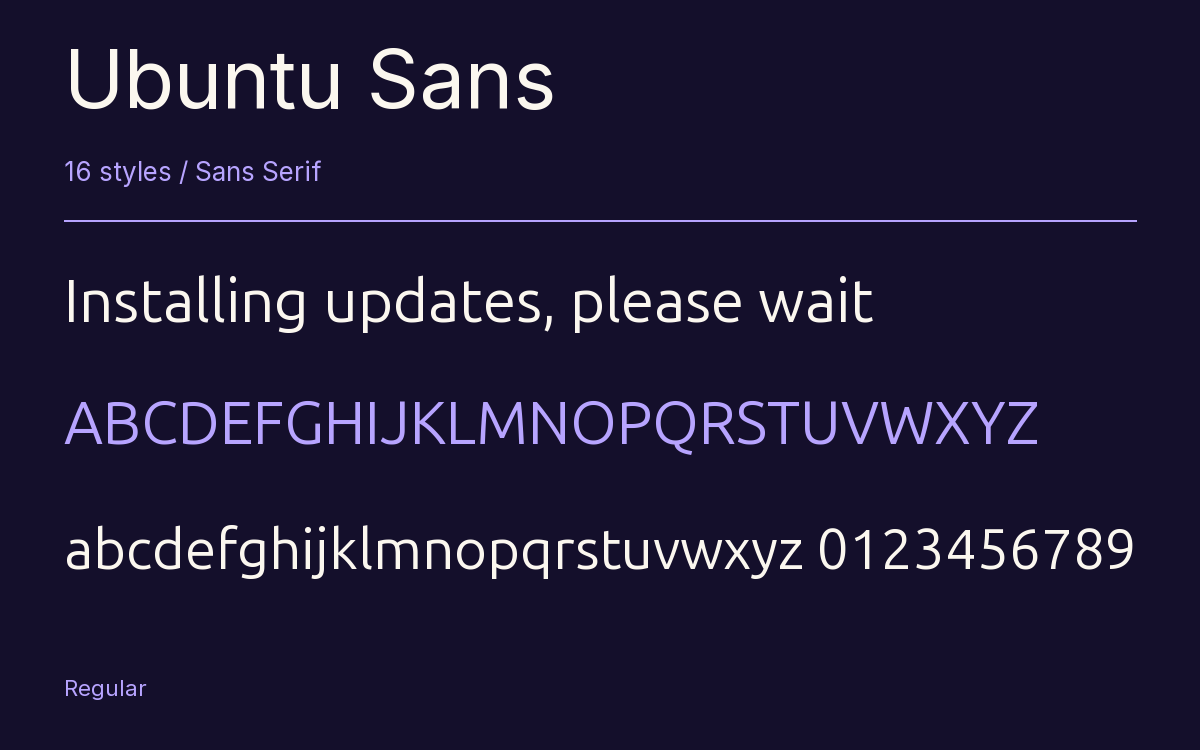
Characters & Figures
1,178 glyphs reported in the reference style. This selection shows 400 recorded characters.
ABCDEFGHIJKLMNOPQRSTUVWXYZ
abcdefghijklmnopqrstuvwxyz
0123456789 & @ ? !
View The Recorded Character Selection
The Font Files
Download
Ubuntu Sans
16 TTF styles with the accompanying CSS, README and license information.
Download ZIP · 1.7 MB ↓- Version
- 1.006
- License
- Ubuntu Font Licence 1.0
Install On Your Computer
Extract the ZIP first. On Windows, select the font files and choose Install from the context menu. On macOS, open the files in Font Book and choose Install.
Use On A Website
Keep the font files and the included stylesheet together. Update the stylesheet path to match your project.
<link rel="stylesheet"
  href="/fonts/ubuntu-sans-3/ubuntu-sans-3.css">

body {
  font-family: 'Ubuntu Sans', sans-serif;
}
Keep the copyright and license notices with redistributed files.
Heading & Body
Compare a larger heading with the same family at reading size.
Ubuntu Sans Heading · Ubuntu Sans Body
Before You Travel
The morning service leaves at nine. Tickets are available at the station, and the platform is listed on the departure board. Keep your ticket until the end of the journey.