
DSEG Weather
Designed By
Keshikan
1 Style Display
/ 0 1 2 3 4 5 6 7 8 9 : ; A B C a b c
DSEG Weather · Regular
Try a short headline and compare the letterforms at a larger scale.
1 style available. Compare the specimens below, or enter your own text.
Download DSEG Weather ↓TTF · SIL Open Font License 1.1
Set Your Own Text
Change the style and size to compare the letterforms.
/ 0 1 2 3 4 5 6 7 8 9 : ; A B C a b c
A Headline In Place
DSEG Weather · Regular
A poster setting with supporting text.
Character Selection
/ 0 1 2 3 4 5 6 7 8 9 : ; A B C a b c
Try your own text above to check connected letterforms and spacing in context.
1 Style,
One Family
Every available style is shown below in its own font file.
Regular400
/ 0 1 2 3 4 5 6 7 8 9 : ; A B C a b c
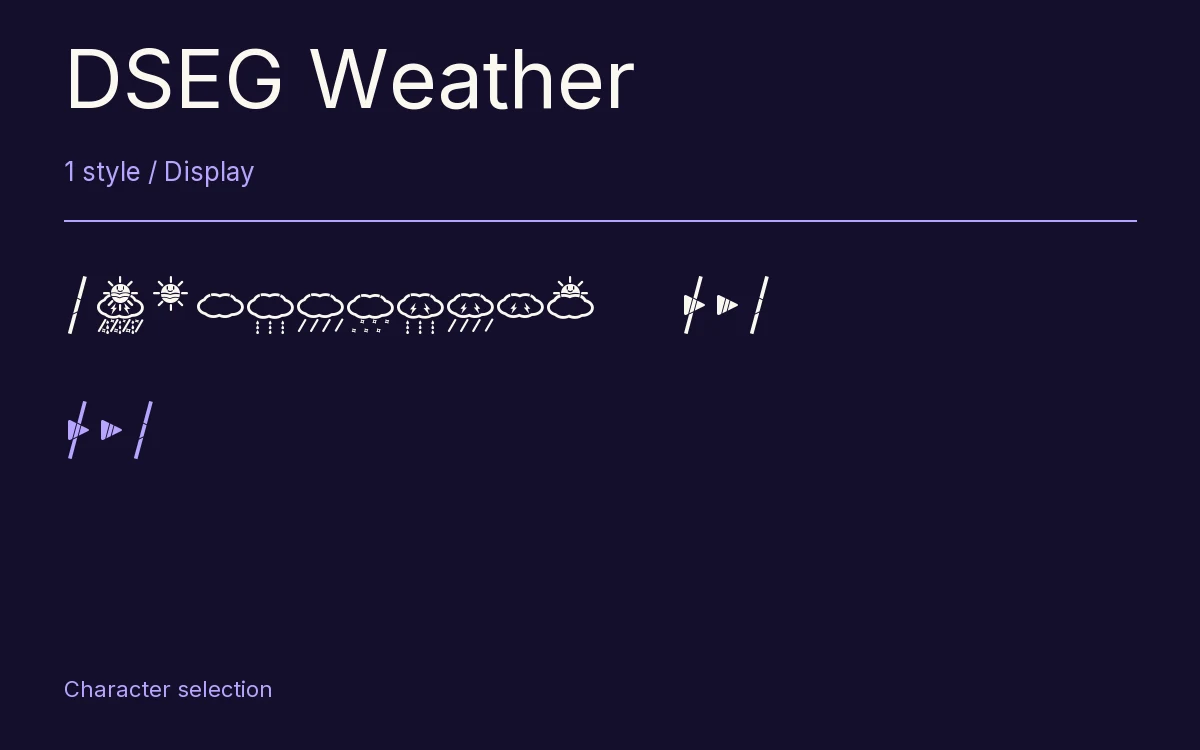
The icons sit on the number keys. Keshikan drew DSEG Weather as a set of LCD weather symbols to go with his 7 and 14-segment fonts, and he put them where a programmer can reach them without looking anything up:
- 1 sun, 2 cloud, 9 sun and cloud
- 3 rain, 4 hard rain, 5 snow
- 6 thunder with rain, 7 thunder with hard rain, 8 thunder
- 0 every segment of the display lit
So a forecast feed that returns a code can be turned into a picture by printing a digit, which makes it handy in a small web widget or a hardware mockup.
Blanking works differently from the other DSEG fonts. The icons do not all share 1 width, so there are 2 all-off characters, : and ;, and the project’s table says which to use. The set arrived in version 0.40, in January 2017, and the whole font is 20 characters in 1 Regular.
Characters & Figures
20 glyphs reported in the reference style. This selection shows 19 recorded characters.
/ 0 1 2 3 4 5 6 7 8 9 : ; A B C a b c
View The Recorded Character Selection
The Font Files
Download
DSEG Weather
1 TTF style with the accompanying CSS, README and license information.
Download ZIP · 10 KB ↓- Version
- 0.3
- License
- SIL Open Font License 1.1
Install On Your Computer
Extract the ZIP first. On Windows, select the font files and choose Install from the context menu. On macOS, open the files in Font Book and choose Install.
Use On A Website
Keep the font files and the included stylesheet together. Update the stylesheet path to match your project.
<link rel="stylesheet"
  href="/fonts/dseg-weather/dseg-weather.css">

body {
  font-family: 'DSEG Weather', sans-serif;
}
Keep the copyright and license notices with redistributed files.