
Noto Sans Lycian
Designed By
1 Style Sans Serif
𐊀 𐊁 𐊂 𐊃 𐊄 𐊅 𐊆 𐊇 𐊈 𐊉 𐊊 𐊋 𐊌 𐊍 𐊎 𐊏 𐊐 𐊑 𐊒 𐊓 𐊔 𐊕 𐊖 𐊗
Noto Sans Lycian · Regular
Compare the family in headings, short labels and paragraph text.
1 style available. Compare the specimens below, or enter your own text.
Download Noto Sans Lycian ↓TTF · SIL Open Font License 1.1
Set Your Own Text
Change the style and size to compare the letterforms.
𐊀 𐊁 𐊂 𐊃 𐊄 𐊅 𐊆 𐊇 𐊈 𐊉 𐊊 𐊋 𐊌 𐊍 𐊎 𐊏 𐊐 𐊑 𐊒 𐊓 𐊔 𐊕 𐊖 𐊗
A Clear Hierarchy
Noto Sans Lycian · Regular
Headings, labels and running text.
Character Selection
𐊀 𐊁 𐊂 𐊃 𐊄 𐊅 𐊆 𐊇 𐊈 𐊉 𐊊 𐊋 𐊌 𐊍 𐊎 𐊏 𐊐 𐊑 𐊒 𐊓 𐊔 𐊕 𐊖 𐊗
Try your own text above to check connected letterforms and spacing in context.
1 Style,
One Family
Every available style is shown below in its own font file.
Regular400
𐊀 𐊁 𐊂 𐊃 𐊄 𐊅 𐊆 𐊇 𐊈 𐊉 𐊊 𐊋 𐊌 𐊍 𐊎 𐊏 𐊐 𐊑 𐊒 𐊓 𐊔 𐊕 𐊖 𐊗
The Lycian language of what is now southern Turkey was written in 29 letters, left to right, between about 500 and 330 BCE, and the shapes look a lot like archaic Greek. That is the whole alphabet.
Noto Sans Lycian covers exactly that set and nothing more, no Latin, no punctuation, so pair it with another Noto font for the surrounding text. The Monotype Design Team drew it with plain, even strokes for Google’s Noto collection.
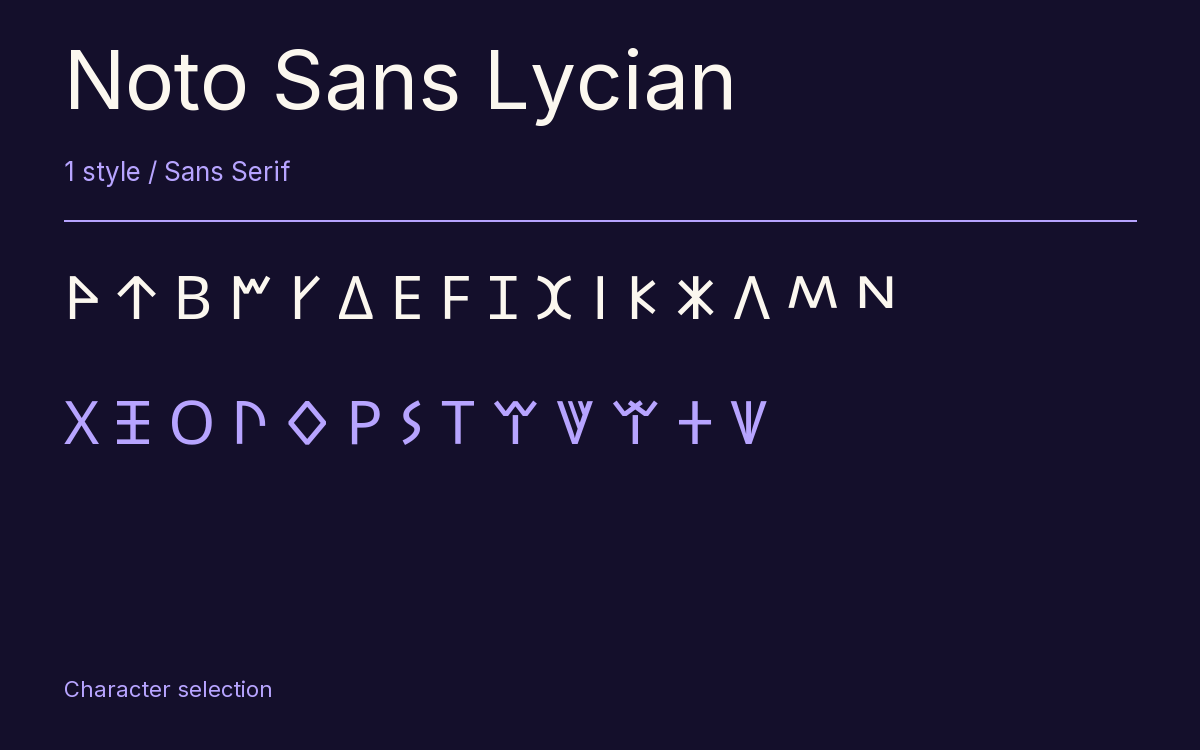
Characters & Figures
33 glyphs reported in the reference style. This selection shows 29 recorded characters.
𐊀 𐊁 𐊂 𐊃 𐊄 𐊅 𐊆 𐊇 𐊈 𐊉 𐊊 𐊋 𐊌 𐊍 𐊎 𐊏 𐊐 𐊑 𐊒 𐊓 𐊔 𐊕 𐊖 𐊗
View The Recorded Character Selection
The Font Files
Download
Noto Sans Lycian
1 TTF style with the accompanying CSS, README and license information.
Download ZIP · 6 KB ↓- Version
- 2.000
- License
- SIL Open Font License 1.1
Install On Your Computer
Extract the ZIP first. On Windows, select the font files and choose Install from the context menu. On macOS, open the files in Font Book and choose Install.
Use On A Website
Keep the font files and the included stylesheet together. Update the stylesheet path to match your project.
<link rel="stylesheet"
  href="/fonts/noto-sans-lycian-2/noto-sans-lycian-2.css">

body {
  font-family: 'Noto Sans Lycian', sans-serif;
}
Keep the copyright and license notices with redistributed files.